Cloud Desktop Hosting: What It Is and Why It Matters
Key Takeaways
- Cloud hosting is computing done over the internet, using networks of servers in secure data centers rather than hardware in your office.
- Cloud hosting technology includes three main service models: infrastructure as a service (IaaS), platform as a service (PaaS), and software as a service (SaaS).
- Cloud desktop hosting, also known as Desktop as a Service (DaaS), gives your team a full desktop environment they can access from any device, anywhere.
- Deployment models include public cloud, private cloud, hybrid cloud, and managed cloud, each offering a different level of control and cost structure.
- Cloud hosting can be more secure than a local server when you choose the right provider and follow good security practices, including multifactor authentication and disaster recovery planning.
- The benefits of cloud hosting, from cost savings to anywhere access, give accounting firms and small businesses enterprise-grade tools without enterprise-level prices.
Cloud hosting technology has been around for years.
You’ve probably used it several times in the last 24 hours, whether you were:
- Checking your email
- Browsing photos on your phone, laptop, or tablet
- Streaming your favorite show
- Co-editing a document with a colleague
Welcome to the invisible revolution happening inside countless secure data centers around the world.
Every day, we tap into a wide network of computing resources that power our lives, often without noticing. Still, many business owners, especially those running smaller businesses and accounting firms, hesitate to adopt cloud hosting.
The reasons usually come down to productivity, security, compatibility, or a general resistance to change.
This post walks you through the basics, clears up the confusion, and shows you what cloud computing services can do for your business.
What Is Cloud Hosting?
Cloud hosting is the practice of running your applications, websites, and data on a network of virtual and physical servers in secure data centers, accessible over the internet.
Unlike traditional shared hosting on a single physical server, cloud hosting draws on pooled computing resources, making it more flexible, scalable, and cost-effective for businesses of all sizes.
What makes cloud hosting powerful is the scale behind it. Instead of buying, housing, and maintaining your own physical servers, you draw on shared cloud infrastructure that a provider manages for you. You get the computing power you need, when you need it, without the upfront investment.
Cloud hosting is often classified as infrastructure as a service (IaaS), and it serves as the foundation for a broader range of cloud computing services, from simple data storage to full desktop environments. It’s what makes it possible for your entire firm to work from different locations without missing a beat.
How Does Cloud Hosting Work?
Cloud hosting works by distributing your data and applications across a network of servers in data centers located nationwide, or worldwide, depending on your provider.
When one server reaches capacity or goes offline, your provider routes traffic to another, keeping your business running without interruption. Inside those data centers, providers run virtual machines on shared physical hardware. Each virtual machine stays isolated from the others, meaning your data and your clients’ data never mix with another business’s information.
Here’s what happens in the background when you connect:
- You reach the cloud through any internet-connected device.
- You retrieve data from secure cloud storage.
- Your provider handles maintenance, updates, security, and disaster recovery.
Reputable providers build redundancy into their data centers, measured in tiers from Tier I to Tier IV, with higher tiers offering greater uptime and protection.
What Is Cloud Desktop Hosting?
Cloud desktop hosting, also called Desktop as a Service (DaaS), takes cloud hosting technology a step further.
Instead of hosting individual files or applications in the cloud, cloud desktop hosting moves your entire desktop environment, including your operating system, applications, and data storage, into the cloud.
Your staff can log in from any device and arrive at the same familiar workspace every time. Whether someone is working from the office, their home, or a client site, the desktop looks and behaves exactly the same. The only thing that changes is the screen they’re using.
This is meaningfully different from traditional Virtual Desktop Infrastructure (VDI), which requires your organization to purchase, house, and manage on-site servers. With cloud desktop hosting, that infrastructure lives with your provider. They handle the hardware, security patches, and updates. You focus on your clients.
For accounting firms managing remote staff, seasonal workers, or multiple office locations, cloud desktop hosting is a practical way to standardize access, tighten security, and reduce IT overhead. Your team can reach QuickBooks® Desktop (QBD), tax software, and client files from anywhere, with consistent performance and without leaving sensitive data on a local device.
The Main Types of Cloud Hosting Technology
When people talk about types of cloud computing, they usually mean two things:
- the service model (who manages what) and
- the deployment model (who the cloud is built for)
Service models describe how much of the technology stack the provider handles. Deployment models describe who the cloud infrastructure is built for.
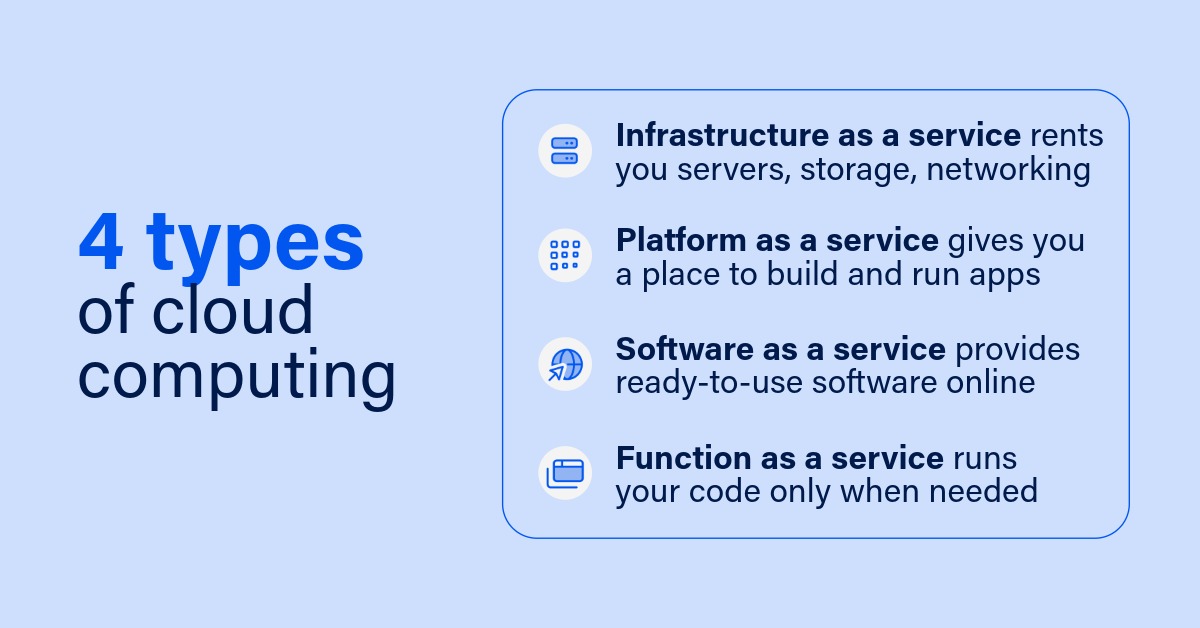
The four main cloud service models are:
1. Infrastructure as a service (IaaS)
Infrastructure-as-a-service gives you the building blocks: servers, storage, and networking, delivered over the internet on a pay-as-you-go basis.
You manage the operating systems and applications; the provider manages the physical servers and data centers.
IaaS suits businesses that want control over their environment without buying and maintaining their own hardware.
2. Platform as a service (PaaS)
Platform-as-a-service goes a step further.
The provider manages the underlying infrastructure and operating systems, giving you a ready-made platform to build and run applications.
This model is popular with development teams that want to focus on their software rather than the servers it runs on.
3. Software as a service (SaaS)
Software-as-a-service is the model most people already know.
Instead of installing a program on every computer, you reach it through a web browser, and the provider handles everything behind the scenes.
QuickBooks® Online (QBO), Microsoft 365, and Zoom are all SaaS examples. You log in and start working.
4. Function as a service (FaaS) and serverless computing
Function-as-a-service, often called serverless computing, is the most hands-off model.
Your code runs only when it’s needed, and you pay only for the computing resources you actually use.
Despite the name, there are still servers involved; you just never have to think about them.
Public, Private, Hybrid, and Managed Cloud
Beyond service models, cloud hosting comes in four deployment models. Each offers a different balance of control, security, cost, and flexibility. The right choice depends on your business’s size, industry, and compliance requirements.
The chart below compares them at a glance.
| Public | Private | Hybrid | Managed | |
| Best For | Small businesses needing flexibility and cost efficiency. | Organizations requiring maximum security and control. | Businesses wanting a balance of security and scalability. | Firms that want a third party to handle all day-to-day cloud operations. |
| Security Level | Enterprise-grade shared security. | Maximum control over security measures. | Customizable security levels. | Security managed and maintained by your provider. |
| Cost Structure | Pay-as-you-go; lowest upfront costs. | Higher initial investment; predictable costs. | A mix of fixed and variable costs. | Subscription-based; predictable monthly costs. |
| Scalability | Instant scaling up or down. | Limited by private infrastructure. | Flexible scaling across both environments. | Scales on demand; managed by your provider. |
| Control | Provider manages the cloud infrastructure. | Complete control over your environment. | Control over sensitive data; flexibility for everything else. | Provider manages operations; you set the goals. |
| Typical Uses | Email, file sharing, and basic business apps. | Sensitive data and regulated industries. | A mix of sensitive and general business operations. | Accounting firms, healthcare, and compliance-driven businesses. |
Already Using Cloud-Based Apps? Here’s What a Unified Cloud Platform Changes
Cloud-based apps like QuickBooks® Online, Microsoft 365, and Zoom do their jobs well. But they work separately. Think of them like streaming services. Netflix is for movies. Spotify is for music. Dropbox is for file storage. Each one does its job, but they all operate in their own lane.
- Running your business this way can mean:
- Separate login credentials and security settings for every platform
- Data that doesn’t automatically sync between systems
- No central place to manage user access when someone joins or leaves the firm
A comprehensive cloud platform changes that experience. It creates a unified workspace that stays consistent whether you’re on your office computer, your home laptop, or a tablet.
- Your entire desktop, anywhere: Take your whole workspace, with all your apps and files, and use it on any device, just as you left it.
- Everything in one place: When you update something in one program, it updates everywhere, so there’s no copying and pasting between platforms.
- Simpler IT management: Instead of managing 20 apps and user accounts, you control access from one place. When someone leaves the firm, one change removes their access to everything.
- Better protection: Instead of wondering whether each app is secure, your entire virtual desktop is protected with enterprise-grade security.
- Room to grow: As your business grows, you can add users or cloud storage instantly, and scale back just as easily when things slow down.
Is Cloud Hosting Secure?
This is one of the first questions people ask, and for good reason. You’re putting valuable business data, and your clients’ data, somewhere outside your office walls. As long as you choose the right provider and follow proper security practices, cloud hosting can be more secure than your local computer or office server.
Consider cloud security like a high-tech bank. The bank provides vaults, security systems, and around-the-clock monitoring. It also gives you a secure card and PIN to reach your account. The bank’s security is excellent, but it only works if you keep your card and PIN safe.
Cloud hosting works the same way. Leading providers invest in security measures that most small businesses couldn’t afford to build on their own, including encryption, multifactor authentication, and continuous monitoring. They also build disaster recovery into their cloud infrastructure, so your data is backed up and recoverable if something goes wrong. Strong cloud security still depends on good user habits. The best protection in the world can’t undo a weak password or an unsafe click.
The Benefits of Cloud Hosting for Your Business
The benefits of cloud hosting look a little different depending on who you are.
For small businesses, the biggest benefit is that cloud hosting levels the playing field. You get enterprise-grade tools and security without enterprise-level prices, plus the freedom to work from anywhere and scale computing resources instantly. Built-in disaster recovery and automatic updates mean you can focus on growing your business instead of managing technology.
The benefits of cloud computing look a little different depending on who you are, so let’s break them down by audience.
Learn more about the cloud for small businesses.
For accounting firms, cloud hosting technology is transformative. You can reach your tax software and client files securely from anywhere, scale your computing resources during busy season, and stay compliant through automatic updates. Your team can collaborate with clients while keeping sensitive data safe, which frees you to serve clients instead of managing IT.
A few trade-offs worth knowing:
- Reliable internet: Cloud hosting needs a stable connection. A good provider will help you confirm your bandwidth is sufficient, and most offer offline capabilities and redundant systems for the moments your connection drops.
- Team adoption: Cloud hosting is only as good as you make it. Most teams adapt quickly, especially with the training and support that come with professional cloud hosting services.
- Data security: Moving sensitive financial data to the cloud can feel daunting, but the right cloud platform actually strengthens security and control rather than weakening it.
Find out if your firm is ready for cloud technology.
Choosing the Right Cloud Hosting Provider
By choosing the right service model and deployment option, you can build a technology foundation that grows with your business while keeping costs predictable and manageable.
As you weigh your options, the provider makes all the difference. Look for solutions that offer award-winning support, strong security, reliable disaster recovery, and the flexibility to adapt as your needs change. Ready to see whether an intelligent cloud platform is right for you?