

You Need a Data Backup Plan: Here’s How to Build One
Key Takeaways
- A complete data backup plan has five parts: know your critical data, set RTO and RPO targets, apply the 3-2-1-1-0 backup strategy, choose cloud hosting, and test on a regular schedule.
- The original 3-2-1 rule (three copies, two media types, one offsite copy) is no longer enough on its own. Modern ransomware targets backup systems directly, which is why the strategy now includes one immutable or air-gapped copy and zero tolerance for recovery errors.
- The FTC Safeguards Rule and IRS Publication 4557 both require documented backup and recovery practices. For accounting firms, backup planning is a compliance obligation, not just a precaution.
- Ransomware attackers now target backup systems directly. A backup that is not stored offsite or protected with immutable storage may not survive the same attack that hits live data.
- Cloud hosting with real-time replication and offsite redundancy is the strongest disaster recovery foundation for accounting firms operating today.
What Is a Data Backup Plan?
A data backup plan is a documented strategy for copying, storing, and restoring a firm’s critical data so operations can continue after accidental deletion, ransomware, hardware failure, or disaster. It defines what gets backed up, how often, where copies live, and how quickly and completely they can be restored.
Why Your Firm Needs a Data Backup and Recovery Plan
Data loss hits accounting firms on three fronts: financial, reputational, and legal:
1. Financially
On the financial side, the numbers are severe.
- IBM’s 2025 Cost of a Data Breach Report puts the average global cost of a data breach at $4.44 million.
- Sophos data from 2024 shows the mean recovery cost reached $2.73 million, up nearly $1 million from 2023.
2. Reputationally
The reputational fallout may be even harder to recover from.
Research from Vercara’s 2024 Consumer Trust and Risk Report found that more than half (58%) of consumers believe brands that get hit with a data breach are not trustworthy, and 70% would stop using a brand that suffered a security incident.
For accounting firms where long-term client relationships are the core of the business, that number is catastrophic.
3. Legally
Then there’s the compliance risk. Both the FTC Safeguards Rule and IRS Publication 4557 require accounting firms to implement and document data backup and recovery practices.
For firms filing 11 or more federal returns annually, this isn’t optional guidance. It’s a legal requirement.
FTC civil penalties are significant per violation per day. In the first half of 2025 alone, an IRS news release reported that nearly 300 data breaches affecting tax professionals exposed data on up to 250,000 clients.
Would your firm survive the combined financial, reputational, and regulatory fallout of a serious data-loss event? Without a data backup and recovery plan in place, the odds are not good.
What Data Loss Really Looks Like for Accounting Firms
Data breaches and natural disasters tend to get the most attention as causes of data loss. But most firms face a much broader set of risks than they realize.
- Ransomware. Ransomware is now the leading cause of data loss for professional services firms. Attackers increasingly target backup systems directly, which means a backup that isn’t stored offsite or protected with immutable storage may be compromised right alongside your live data.
- Accidental deletion. One clumsy keystroke and a critical file disappears. Without proper backup software, it doesn’t come back.
- Rogue savers. These are employees who save files outside the firm’s established workflow, for example, saving to a local hard drive instead of a shared cloud environment. Hard drives fail without warning, and when they do, everything on them is gone permanently.
- Electrical failures. Power outages and surges can happen without a storm or flood in sight. Computer and server data can be lost in an instant.
- Third-party vendor outages. Accounting firms rely on cloud applications, tax platforms, and document management systems. When those vendors experience outages, your firm’s productivity can stop, even if your own infrastructure is intact.
Any of these events can trigger a crisis. The difference between firms that recover and firms that don’t almost always comes down to whether a solid backup planning strategy was in place before it happened.
Older, manual approaches compound the risks
Firms that lean on older, manual approaches to data protection compound every one of these risks. A few common patterns worth reviewing:
Manual processes
Manually copying files to an external drive, logging backup activity in a spreadsheet, restoring files by hand
Physical media only
Backup tapes, external hard drives, USB flash drives, DVDs, CDs
On-premises-only storage
Network-attached storage, dedicated backup servers, local server rooms with no offsite copy
None of these approaches are disqualifying on their own. The risk shows up when a firm relies on them exclusively, with no automated, offsite, or immutable copy backing them up.
Not sure whether your firm’s security posture is ready to handle modern threats? Our cybersecurity guide for the modern accountant is a strong starting point.
Download: The Ultimate Cybersecurity Guide for the Modern Accountant
How to Create a Data Backup Recovery Plan in 5 Steps
Knowing you need a plan and actually building one are two different things. A data backup recovery plan isn’t a single tool or a single purchase. It’s a set of deliberate choices about what you’re protecting, how you’re protecting it, and what your firm does when something goes wrong.
Step 1: Identify your critical data and systems
Before you can protect your data, you need to know what matters most.
Start by cataloging the systems and data your firm can’t operate without:
- Tax software
- Client records
- Document management system
- Billing data
- Cloud-based applications
- Any software or apps your team uses daily
Not all data carries the same urgency. Rank your systems by how quickly you’d need each one restored. Losing access to your primary client database during tax season is a crisis. Losing access to a marketing archive is an inconvenience. Knowing the difference is what makes your plan realistic and affordable.
Step 2: Set your disaster recovery targets
Every sound disaster recovery plan rests on two core metrics: RTO and RPO. Both are easier to understand than they sound.
RTO (Recovery Time Objective)
RTO (Recovery Time Objective) is how fast your firm needs systems back online after an outage. During tax season, can your firm function if systems are down for eight hours? Four hours? Thirty minutes? Your honest answer to that question is your RTO.
RPO (Recovery Point Objective)
RPO (Recovery Point Objective) is how much data you can afford to lose, measured in time. If you back up nightly and a server crashes at 4 p.m., you lose a full day of work entries. If that’s unacceptable during peak filing periods, your RPO needs to be tighter, which means more frequent backups.
Setting these targets before you choose a backup solution ensures your technology is built around your real-world needs.
And because both the FTC Safeguards Rule and IRS Publication 4557 expect documented recovery procedures, having written RTO and RPO targets also becomes part of your compliance record.
Step 3: Apply the 3-2-1-1-0 backup strategy
The foundation here is the original 3-2-1 backup rule, a long-standing strategy for protecting data that calls for maintaining:
- 3 copies of your data (production data plus two backups)
- 2 different types of storage media (for example, a NAS device and cloud storage)
- 1 copy stored offsite (for example, in the cloud or at a secure remote location)
This approach ensures redundancy against accidental deletion, ransomware, natural disasters, and hardware failure by removing any single point of failure. It is a solid starting point, but cybersecurity experts now recommend building on it with two additions that address the way ransomware actually works today. The updated model is called 3-2-1-1-0.
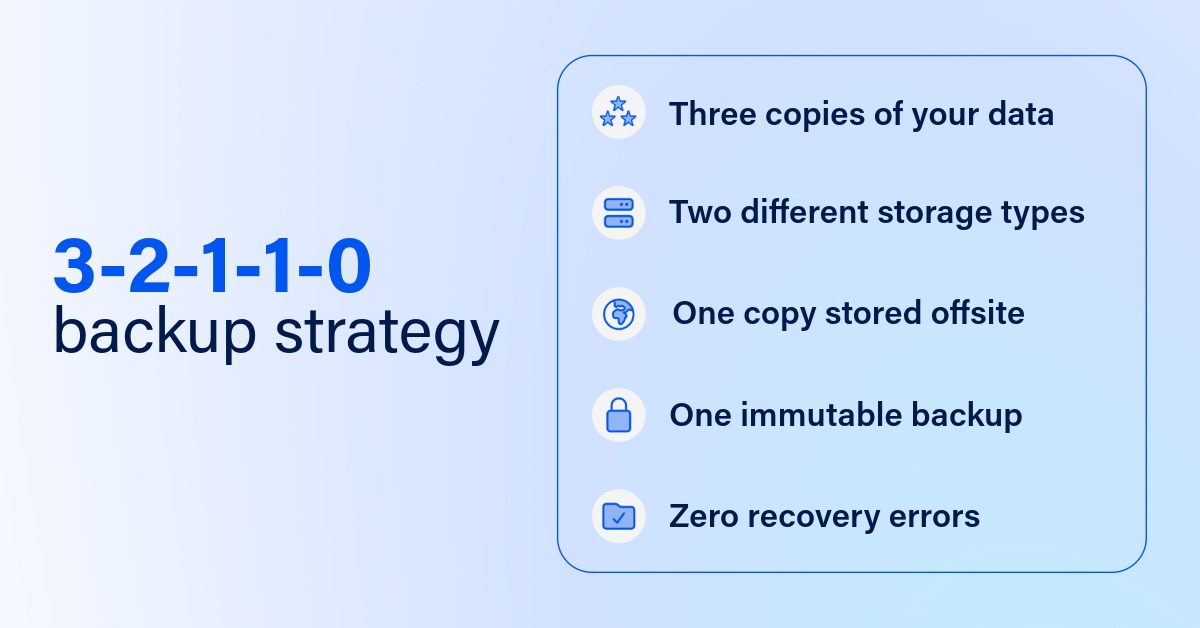
+1: One immutable or air-gapped copy
An immutable backup is a copy of data that cannot be modified, overwritten, or deleted for a defined retention period, even by an administrator account.
This matters because ransomware attackers now routinely target backup systems before triggering encryption across a network.
According to Sophos research, 94% of ransomware victims had attackers attempt to compromise their backups, and 57% of those attempts succeeded. A backup sitting on the same network as your production data is just as reachable to an attacker as everything else.
+0: Zero recovery errors
The final component addresses a risk most firms don’t discover until it’s too late: backup jobs that complete successfully but fail during recovery. The “0” in 3-2-1-1-0 means zero recovery errors, confirmed through regular automated testing. A backup that has never been tested is not a reliable backup.
For accounting firms, the zero-errors requirement maps directly to what the FTC Safeguards Rule and IRS Publication 4557 expect from your backup program. Documentation that backups exist is not enough. You need evidence that they work, and that evidence needs to be current. Learn what the IRS Security Six requires and how to implement each control.
Putting the security half of 3-2-1-1-0 into practice comes down to three protections working together:
Data encryption
The process of converting data into a coded format to prevent unauthorized access
Air-gapped backups
Backups stored on systems or media physically isolated from networks, preventing cyberattacks
Immutable backups
Backups that cannot be altered or deleted for a set period, protecting against tampering
The other lever for making 3-2-1-1-0 efficient is choosing the right mix of backup types for your schedule:
Full backups
A backup that copies the entire dataset regardless of changes; complete but typically run less frequently due to time and storage demands
Differential backups
A backup that copies all data changed since the last full backup; simpler to restore, but backup size grows over time
Incremental backups
A backup that copies only the data changed since the last backup, full or incremental; minimizes time and storage, but restoring requires the full backup plus every incremental in sequence
Step 4: Choose cloud hosting as your backup foundation
Cloud hosting isn’t just a productivity tool for accounting firms; it’s the backbone of a reliable data backup and recovery plan. Cloud-based backup addresses the two most common failure points: geographic isolation and human consistency.
Data stored offsite in the cloud can’t be touched by a fire, flood, or power outage. When backups are automated and monitored, you eliminate the risk of someone forgetting to run them or saving to the wrong location.
When you evaluate a modern backup solution, look for:
- Automatic, centrally managed backups across on-premises, cloud, and SaaS application data
- Continuous data protection with fast restore capability
- Instant recovery and virtual standby for near-zero RTOs
- Protection for SaaS applications, such as Microsoft 365
- AI- and machine learning-based anomaly detection to flag unusual activity before it spreads
Step 5: Test your plan and keep it current
An untested backup is not a reliable backup. Backups fail silently, files become corrupted, and restore procedures often turn out to be more complicated than expected. Quarterly restore tests are the only way to know whether your data backup recovery plan will actually work under pressure. Schedule periodic trial runs where you simulate a data loss scenario and practice recovering data from both local and cloud-based backups. Both the FTC Safeguards Rule and IRS Publication 4557 expect evidence of regular testing, not just documentation that backups exist.
Document your backup and restore procedures in detail, and train every relevant team member on how to follow them, so your firm can recover quickly when the need arises.
Beyond testing, review your plan whenever your firm changes significantly. New software, new staff, new locations, or a major client transition can all create gaps in coverage that didn’t exist when you originally built the plan.
A data backup plan focuses on restoring your data; if you are also mapping out communication protocols, failover systems, and staff roles during a crisis, that is the broader work covered in a disaster recovery plan.
What Is the Best Data Backup Plan for Accounting Firms?
The best data backup plan for accounting firms combines the 3-2-1-1-0 strategy with cloud hosting built specifically for the security, compliance, and uptime demands of the accounting profession.
Rightworks’ cloud hosting was built with exactly that in mind. Our cloud technology:
- Stores data across multiple Tier IV data centers in geographically diverse US locations.
- Replicates data in real time and backs it up nightly.
- Retains data on a rolling, 90-day backup schedule.
That means if your data is accidentally deleted, corrupted by ransomware, or lost in a local disaster, Rightworks can recover it. What could have been a firm-ending event becomes a manageable one.
Don’t wait for a crisis to start thinking about backup planning.
Download our cybersecurity guide to start building a smarter data backup plan for your firm today.
FAQ
The 3-2-1 backup rule calls for keeping three copies of your data, on two different types of storage media, with one copy stored offsite. It protects against a wide range of data loss scenarios by removing any single point of failure, though it does not on its own address backups that ransomware can reach and alter.
3-2-1-1-0 builds on the original rule with two additions: one immutable or air-gapped copy that cannot be altered or deleted for a set period, and zero tolerance for recovery errors, confirmed through regular automated restore testing. Both additions respond directly to ransomware that targets backup systems.
At minimum, firms should run a full restore test quarterly, simulating an actual data loss scenario rather than only checking that a backup job completed. Automated, ongoing monitoring should run continuously between those scheduled tests.
Neither regulation mandates a specific backup technology, but both require documented backup and recovery practices, including evidence that backups are tested and functional. Firms filing 11 or more federal returns annually are required to meet these standards.
An immutable backup is a copy of data that cannot be modified, overwritten, or deleted for a defined retention period, even by an administrator account. It is designed specifically to survive an attacker who has already gained access to a network.
