How to Write an AI Policy for Your Accounting or Tax Firm
An AI policy for an accounting or tax firm is a written set of rules that says how staff can and cannot use AI tools with client data, what tools are approved, and how mistakes or misuse get handled. This post walks through exactly how to write one that fits a small CPA or tax practice, using the framework accountants need most in 2026: what’s embedded in your tools already, what’s approved, and who stays accountable when AI is involved.
Key Takeaways
- AI isn’t a tool your staff goes to use; it’s embedded in the software they already open every day. Your policy needs to reflect that reality.
- An AI policy is a risk, compliance, and ethics document, not a tech rule. Treat it with the same weight as your WISP or confidentiality agreements.
- IRS OPR’s June 2026 guidance under Circular 230 requires firms to have a written AI policy covering approved tools, data handling, training, and documentation of AI use.
- All AI-assisted work must be reviewed by a licensed professional before it reaches a client. Human judgment and accountability can’t be delegated to AI.
- Put a review date on the calendar. AI tools evolve faster than most firm documents, and a policy that’s a year old may already be missing tools your staff use daily.
AI Has Changed—Your Policy Needs to Change Too
If your firm created an AI policy in the last year or two, when was the last time you updated it?
AI has evolved quickly. What began as employees occasionally using a standalone chatbot is not how AI shows up anymore. It’s embedded in the accounting software you already use, the browser you already have open, and the productivity suite your staff touch every day. Staff doesn’t “go use AI”; they use software that happens to have AI built in. That’s the shift a modern policy needs to account for: AI-assisted work, not an isolated AI tool.
There’s a second shift alongside it. Most policies assume AI only produces content: you ask, it drafts, you review. AI agents change that. An agent can take the next step itself: scheduling a follow-up, updating a record, or completing part of a workflow with limited human input along the way.
The Intuit’s 2026 Accountant Technology Survey found firms are already testing this in tax work:
22% say the highest level of AI autonomy granted for a client deliverable this past season was “review-ready,” meaning AI completed the full draft and a human handled final sign-off, and another 34% used AI to prepare returns and flag exceptions for review.
A policy needs to draw a clear line between AI that drafts for a human to review and AI that acts on a firm’s or client’s behalf.
Where Firms Stand Today
Adoption has matured. Firms that were exploring AI a year or two ago are further along now, and many are moving from adoption toward scale: standardized workflows, firmwide tools, and governance that keeps pace with use.
The AICPA and CIMA Future-Ready Finance Survey found 88% of finance leaders believe AI will be the most transformative technology in their field over the next one to two years, but only 8% feel very well prepared for it.
That gap between belief and readiness is exactly where a clear AI policy earns its keep.
What Is an AI Policy for an Accounting Firm?
An AI policy for an accounting firm is a written document that defines which AI tools staff can use, how client data must be protected, and what review and disclosure rules apply before any AI-assisted work reaches a client.
What it’s not: a tech rule about which app is allowed. It’s a risk, compliance, and ethics document, the same category as your confidentiality agreements or your Written Information Security Plan (WISP). It should be treated with the same seriousness.
Why Accounting and Tax Firms Need an AI Policy Now
AI-assisted work is already inside your firm, whether you’ve written a policy for it or not. It drafts client emails inside Outlook, categorizes transactions inside QuickBooks® Online (QBO), summarizes engagements, pulls action items from meetings, and researches tax code in seconds.
That speed creates real exposure. Sharing confidential client information with an AI tool can create the same risk as sharing it with any other third party: the information entered into a prompt may become part of a training set, and depending on the platform, other users could potentially access it. There’s also reputational risk when an AI-generated error reaches a client without review.
The way people search is changing too. Clients and professionals increasingly ask AI assistants for guidance rather than searching the web directly, which means a clear, well-structured policy helps your firm show up as a trustworthy source in those AI-generated answers, not just in traditional search results.
How to Write an AI Policy for Your Accounting or Tax Firm
Key elements every AI policy for accountants should include
If you’re building an AI policy for a CPA or tax firm, make sure it covers: which tools are allowed, how client data is protected, required human review, disclosure rules, and incident handling.
Click to jump to each AI policy section to learn more.
- Scope and roles (who the policy applies to)
- Approved versus prohibited AI tools
- Client data and confidentiality rules
- Human review and quality control
- Disclosure to clients
- Training and onboarding
- Incident reporting and enforcement
1. Define Your Scope
Decide which teams the policy covers, tax, audit, advisory, bookkeeping, or all of them, and which categories of tools it applies to: chatbots, meeting transcription, embedded research assistants, and AI features already built into software your firm uses. Most firms find AI is already active in more places than expected, since it often arrives quietly through a software update rather than a formal rollout.
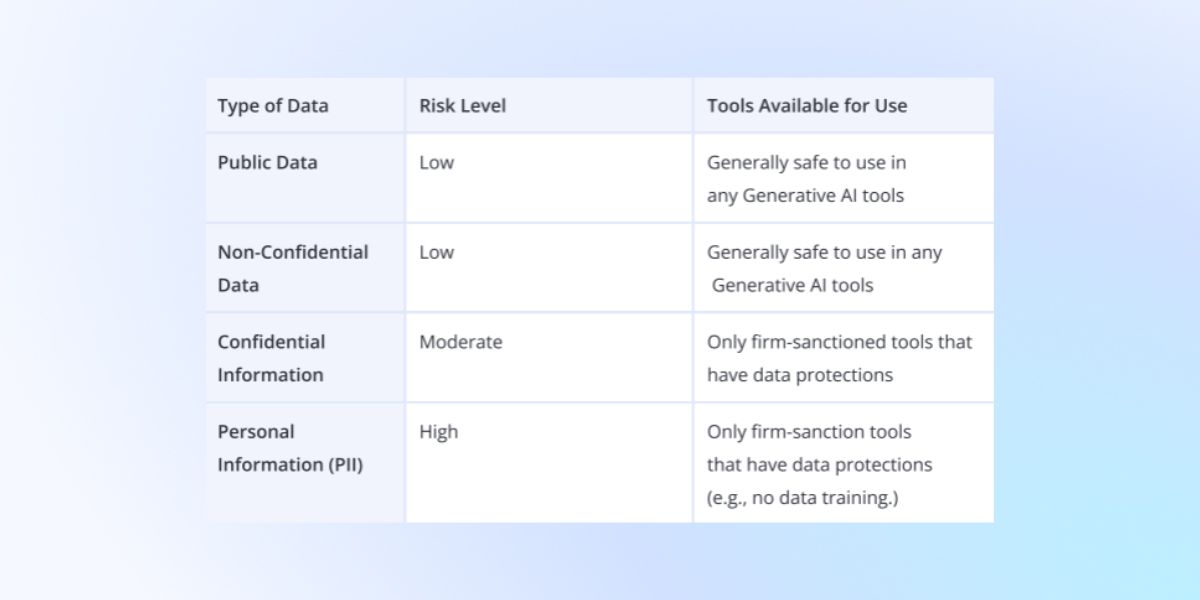
2. Map Client Data & Sensitive Information
Sort the information your firm handles into categories and decide what level of protection each one needs.
3. Choose Approved AI Tools
Sort tools into three buckets: approved for internal use only, approved with client consent, and not approved. Before approving any tool, standalone or embedded in software you already use, evaluate it across these areas:
- Security. How does the vendor protect data in transit and at rest?
- Privacy. Who can view what a user submits, and can it be shared beyond the vendor?
- Data retention. How long does the vendor keep prompts and outputs, and can the firm shorten that window?
- Model training practices. Can firm data train the underlying model, and is there an opt-out?
- Vendor reputation. Does the provider have a track record with regulated industries?
- Regulatory obligations. Does the tool support the firm’s obligations under client contracts and applicable data laws?
- Auditability. Can the firm produce a record of what a tool did and when, if a client or regulator asks?
- Human oversight controls. Does the tool let the firm require a human checkpoint before it takes any consequential action?
A tool that can’t give a straight answer on these points is a tool to avoid, regardless of how useful it looks.
See our SECURE framework for a structured way to run this evaluation. →
4. Set Client Data Rules
State plainly that client data cannot go into unapproved tools. Free, consumer-grade AI accounts typically offer weaker protection than business or enterprise versions, so require the enterprise tier wherever the firm approves a tool for confidential or personal information.
5. Require Human Review & Quality Control
All AI-generated tax advice, memos, or client communications must be reviewed by a licensed professional before anything reaches a client. AI can move faster than a person, but it can’t replace the professional judgment a person brings to the decision, and it can’t be the one held accountable when something goes wrong. Every employee using AI for firm business remains responsible for:
- Verifying the accuracy of AI-generated content before it goes anywhere.
- Exercising professional judgment on anything AI produces or suggests.
- Reviewing every client-facing deliverable, no exceptions.
- Validating calculations, financial data, and tax guidance against a reliable source.
- Complying with the professional, regulatory, and ethical obligations that already govern their work.
6. Disclosure to Clients
When AI plays a role in preparing a client deliverable, disclose that in the engagement letter or through a separate written notice before work begins. The disclosure doesn’t need to name every tool; it should communicate that AI may assist with drafting, research, or analysis, and that a licensed professional reviews and takes responsibility for all final work product.
Consult applicable state board and AICPA guidance when determining the level of disclosure required for your practice area.
7. Plan for Incidents & Enforcement
State the consequences clearly and name a contact for questions or reports:
- Questions about how to proceed in a specific situation go to [name].
- Report suspected violations to [name].
- Noncompliance may result in disciplinary action, up to and including termination.
Ready to skip the blank page?
Rightworks supports accounting and tax firms as they navigate AI adoption and governance. For Rightworks customers, Spark AI—available within OneSpace at no additional charge—includes a Generate an AI Policy workflow that guides firms through the key components of an effective AI policy, helping create a customized starting point aligned to their firm’s tools, data practices, and risk tolerance.
Regulatory and Professional Considerations for AI in Tax and Accounting
IRS OPR and Circular 230 guidance
In June 2026, the IRS OPR issued its first formal guidance on generative AI under Circular 230 (OPR Alert 2026-19).
Their guidance clarified that:
- Practitioners remain fully responsible for AI-assisted work.
- They must review and verify all AI-generated outputs before using them in filings or advice.
Firms must have written AI policies covering:
- Approved tools
- Secure handling of client data
- Training and monitoring
- Documentation of AI use and verification
Because of this, when tax professionals or accounting firms write an AI policy, they often explicitly reference IRS OPR guidance and Circular 230 obligations as a key compliance driver.
AICPA and State Board expectations
When formalizing an AI policy, accounting firms should also consider state board of accountancy and AICPA expectations beyond the IRS OPR guidance.
Many state boards now treat AI ethics and data security as part of their ethics CPE requirements and may expect you to have documented controls around how AI is used in client work, including competence, review, and disclosure. The AICPA has issued guidance and technical Q&As on using technology and AI in audits, tax, and advisory services, emphasizing that:
- CPAs must maintain competence with the AI tools they use.
- Human professional judgment and review cannot be outsourced to AI.
- Firms need to document why AI was used, how outputs were tested, and how confidentiality (e.g., AICPA ET Section 1.700) is protected.
An effective AI policy should explicitly reference these AICPA and state-board expectations, showing that the firm’s AI practices align with both federal (Circular 230) and state/professional standards.
Data Privacy and Client Confidentiality
Firms often treat their AI policy and their Written Information Security Program (WISP) as unrelated documents, but both govern how client data moves, who can access it, and what happens if something goes wrong. An AI policy that doesn’t reference the WISP’s data classification and incident response procedures leaves a gap, and a WISP that doesn’t account for AI tools is already out of date. For a walkthrough of folding AI usage rules directly into your WISP, see How to Add an AI Usage Policy to Your WISP.
Rightworks’ free WISP Analyzer can show where the gaps are, and The Ultimate Cybersecurity Guide for the Modern Accountant walks through the broader security foundation your AI policy should sit on top of.

Implementing Your AI Policy: Training, Onboarding, and Monitoring
Onboarding and Training
Share the policy with the whole team, walk through real examples of what’s allowed and what isn’t, and leave room for questions. A short, focused session works better than a long document nobody reads in full.
Monitoring and Auditing
Keep records of which AI tools are used for firm business and which outputs get used externally.
Updating the Policy
Put a review date on the calendar. AI tools change faster than most firm policies do, and a policy that’s a year old may already be missing tools your staff use daily.
Skip the Blank Page: Start Your AI Policy with Spark AI
We’re here to help. Available to Rightworks customers in OneSpace at no additional charge, Spark AI includes a Generate an AI Policy workflow that helps firms build a customized AI policy faster. Rightworks also provides resources to help firms evaluate and strengthen their WISP, cybersecurity practices, and AI governance approach.
Have questions? Contact the Rightworks team to learn how we can support your firm’s AI adoption and security journey.