Your Tech Stack Is Probably Working Against You. Let’s Fix That.
Does your firm waste time jumping between disconnected apps? Are your staff complaining about manual tasks that should be automated? Are you paying for software that nobody uses?
If you answered yes to any of these questions, your firm is suffering from app sprawl, and you’re not alone.
What is app sprawl? The uncontrolled growth of software applications within an organization.
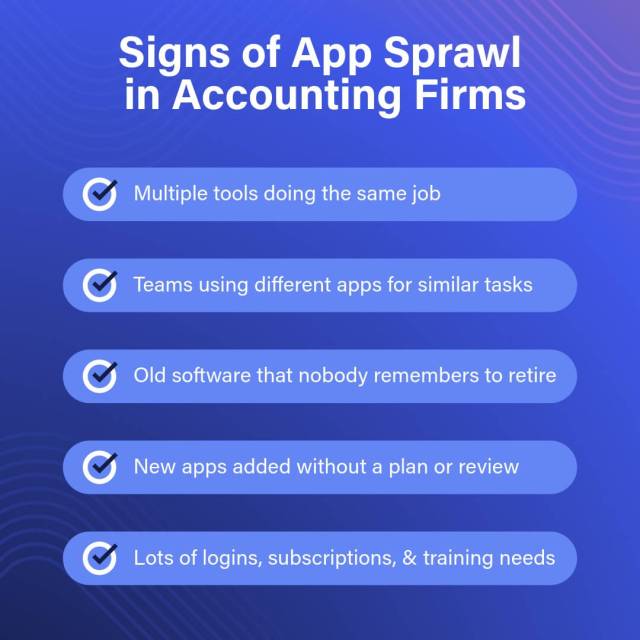
In accounting firms, app sprawl typically shows up in a few different ways. You may be employing multiple tools to do the same or similar job, forgetting to retire old software, adding new apps without a usage plan or thorough vetting and you may be confronted with a growing list of logins to track, subscriptions to manage, and staff training to facilitate.
5 Warning Signs Your Tech Stack Needs Attention
1. You’re drowning in manual, time-consuming tasks
When staff spend hours re-entering data between systems or manually updating multiple spreadsheets, that’s a clear sign your apps aren’t working together properly. Every minute spent on duplicate data entry is a minute not spent serving clients.
2. Outdated processes still run your office
When a firm relies on “the way we’ve always done it,” progress stalls fast. Legacy processes—whether it’s manual data entry, old approval workflows, or clunky routines no one questions anymore—slow everything down and make it harder for your team to adapt. People naturally get comfortable with familiar methods, but holding onto outdated practices in 2025 doesn’t preserve stability; it quietly limits your firm’s ability to grow, innovate, and work efficiently.
3. Your apps live in isolation (classic app sprawl)
If employees need to log into multiple systems just to complete one client task, you have app sprawl. This fragmentation leads to errors, frustration, and lost productivity that directly impacts your bottom line.
4. Security is a nightmare across siloed systems
When each application stores its own data separately, you can’t maintain consistent security standards or know where sensitive client information lives. With cyberthreats evolving daily, this isn’t a risk you can afford to take.
5. New hires struggle with your systems
When new employees take weeks to learn multiple systems with different interfaces and workflows, it’s harder to get them productive quickly. Your tech stack shouldn’t be a barrier to growth.
How to Build & Optimize Your Core Tech Stack
Less is more when it comes to your tech stack. Be intentional about what you select.
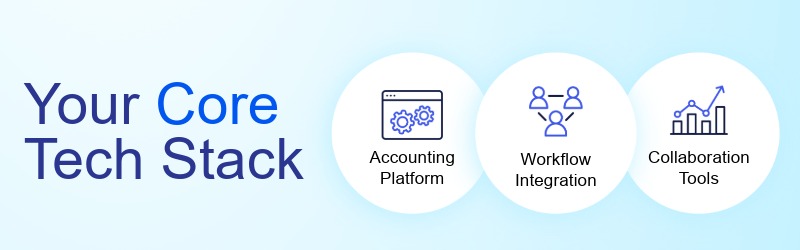
Accounting and Tax Foundation
Start with cloud-based (or hosted) accounting platforms.
- QuickBooks Online leads with robust APIs and integrations that make it a natural hub.
- QuickBooks Desktop works too if hosted in the cloud.
- For tax software, both Thomson Reuters and Wolters Kluwer offer strong cloud options.
Workflow Integration
Here’s where you create real efficiency:
- Payroll: RUN Powered by ADP, QuickBooks Online Payroll, or Gusto
- AP/AR: BILL for streamlined transactions
- Receipt management: Dext Prepare
- Expense reimbursement: Expensify
- Data management: Rightworks Transaction Pro for moving data between QuickBooks and Excel
Team Collaboration Tools
Move to cloud-based tools your staff likely already knows:
Streamline documents and spreadsheets:
- Microsoft Office 365 or Google Workspace (pick one and stick with it)
Enhance communication:
- Slack or Microsoft Teams for instant messaging
- Zoom for video conferencing
- Calendly for appointment scheduling (bonus: it integrates with Zoom)
Straighten up your file storage:
- Google Drive or Microsoft OneDrive for non-transactional documents
Making It All Work Together
The secret isn’t having the most apps—it’s having the right apps that actually talk to each other.
Because cloud-based systems integrate, you get:
- Data flowing automatically between systems
- Real-time reporting from current, accurate numbers
- Centralized information you can trust
- One-time data entry that populates everywhere
As you connect your systems, role-based permissions ensure staff only see what they need, reducing mistakes and keeping sensitive data protected. Single sign-on (SSO) makes it easier for your team to access all their tools with one secure login, which improves adoption and cuts down on password-related issues.
Security Without Sacrificing Usability
Technological advances like generative AI have changed the threat landscape dramatically. You shouldn’t be trying to manage security risks internally. Prevention is cheaper and more effective than remediation.
Look for managed security solutions that:
- Fit into your existing workflow
- Don’t burden your employees
- Protect all your applications consistently
- Control employees’ access to client data
- Include ongoing monitoring and updates
Creating the Right Experience
For your team, the right tech stack eliminates friction and provides on-demand access to everything they need. For clients, it means:
- One central hub (your website) for all interactions
- Online payments
- Document sharing
- Self-help resources
- Mobile-friendly access to important information
Your Action Plan
Building a modern tech stack may feel overwhelming, but it’s completely achievable. Will it take time and patience? Of course. But the benefits are clear: automated workflows, seamless collaboration, virtual work support, and massive time savings.
Start here:
- List your current applications and identify overlaps
- Pick your core cloud platform (accounting/tax software)
- Choose one productivity suite (Microsoft or Google)
- Add integrations that solve specific pain points
- Implement security across all systems
The Bottom Line
Technology is at the heart of every modern firm, and being cloud-based is at the heart of being modern. By organizing your tech stack now, you position your firm to grow sustainably while providing excellent service to clients and a better work environment for staff.
Every manual process you eliminate is time given back to your team. Every integration you add reduces errors. Every security measure you implement protects your firm’s future.
Ready to transform your tech stack? Start by evaluating your current systems against this framework, then prioritize the changes that will have the biggest impact on your firm’s efficiency and growth. Learn how the cloud can help.