
Windows Server 2016 End of Life is January 13, 2027: Are You Ready?
- Microsoft’s latest notice sets Windows Server 2016 end of support for January 13, 2027, and the January 2027 security update is the last one under extended support.
- Drake Tax 2026, the version used for the 2027 filing season, doesn’t support Windows Server 2016, so Drake users need a supported setup before they install it.
- Extended Security Updates add up to three years of security patches, but they don’t add features or change what software vendors support.
- Businesses and firms have four options: upgrade the operating system, replace the server, pay for Extended Security Updates, or move their apps to a managed cloud.
- A new server is a recurring cost, not a one-time purchase, so compare its full cost over its life before you decide.
Microsoft ends extended support for Windows Server 2016 on January 13, 2027.
After that date, the server will still turn on and your files will still open, but Microsoft will stop releasing security fixes for it.
For a small accounting firm or business that runs QuickBooks Desktop, Drake Tax, or UltraTax CS from a server in the office, the timing is hard to ignore. The deadline lands just as filing season starts, and at least one major tax program has already dropped support for Server 2016.
This post explains what Windows Server 2016 end of life means, which tax and accounting apps it affects, and the four realistic options for an office with 15 or fewer users. It also covers when keeping a server still makes sense, because for some offices it does.
When Does Windows Server 2016 Reach End of Life?
Windows Server 2016 reaches the end of extended support on January 13, 2027, according to Microsoft’s Windows Server 2016 lifecycle page. The January 2027 security update is the last one under extended support. The date applies to every edition, including Standard, Datacenter, and Essentials.
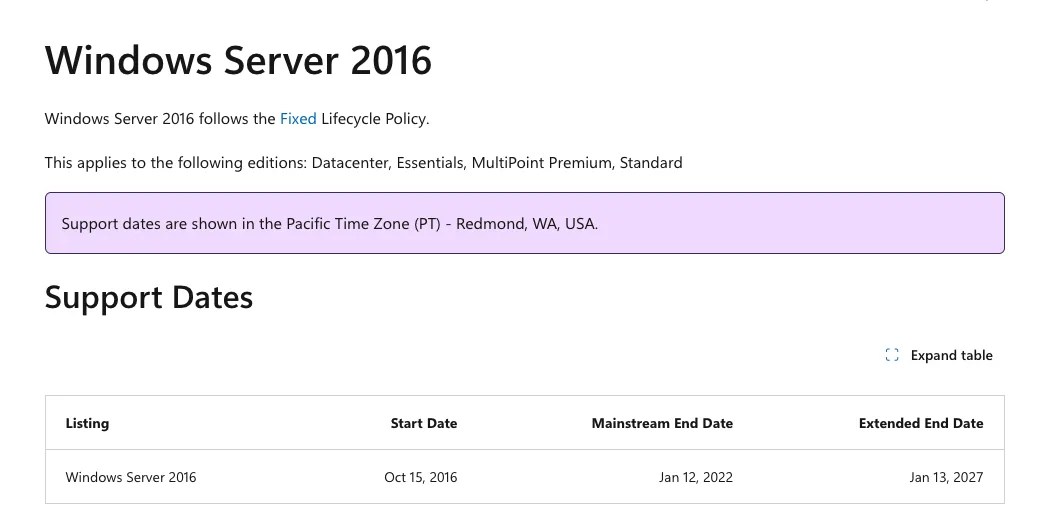
Mainstream support, which covered new features and non-security fixes, already ended in January 2022. What ends in January is the last layer: security updates.
If your office runs Windows Server 2016 Essentials, one more change applies. Microsoft says Essentials features, including Remote Web Access, lose support on the same date. Many small offices use Remote Web Access to reach files and apps from home, so that path becomes unsupported too.
What Changes After Windows Server 2016 End of Support
Nothing shuts off in January. The server keeps running, and staff can keep working. What changes is what stops arriving:
- Security fixes. Vulnerabilities discovered after January won’t be patched unless the server is enrolled in Extended Security Updates. Unpatched systems are a common way attackers get in, which is why regular software patching matters so much for firms that hold taxpayer data.
- Vendor support. Software makers tie their own support to Microsoft’s. Thomson Reuters, for example, includes Windows operating systems Microsoft no longer supports on its list of environments it doesn’t support for CS Professional Suite. When something breaks, a support team may ask you to move to a supported system before it helps.
- Clean answers on security reviews. Tax professionals are expected to protect client data under IRS Publication 4557 and the FTC Safeguards Rule. An unsupported server is harder to defend on a cyber insurance questionnaire, a client security review, or your firm’s own risk assessment.
Will Your Tax and Accounting Software Still Run?
Before you choose an option, check what your apps require. Three programs come up most often in our conversations with firms that still run their own servers: Drake Tax, UltraTax CS, and QuickBooks Desktop.
Drake Tax
Drake Tax is the most urgent case. Drake’s knowledge base states that Windows Server 2016 is no longer supported after Drake Tax 2025. Drake Tax 2026, the version firms use to prepare 2026 returns during the 2027 filing season, supports Windows 11 and Windows Server 2019, 2022, and 2025. If Drake runs from a Server 2016 machine in your office, you need a supported setup before you install the new version. Extended Security Updates won’t change that, because Drake’s requirement is about the operating system version, not its patch level.
UltraTax CS and CS Professional Suite
Thomson Reuters’ current UltraTax CS system requirements still list Windows Server 2016, along with 2019, 2022, and 2025, and network installations must use a full Windows Server installation. Because Thomson Reuters doesn’t support Windows versions that Microsoft has retired, that listing may not hold for long after January. Plan to move UltraTax off Server 2016 within the next year, even if it runs well this season.
QuickBooks Desktop
Intuit publishes system requirements for each QuickBooks Desktop version. For QuickBooks Desktop 2024, Intuit lists Windows Server 2016, 2019, and 2022 (Standard and Essentials) for hosting multi-user access, and it recommends a supported version of Windows for data security. If you’re replacing the server, confirm that your QuickBooks version lists the new server’s operating system before you buy hardware. If you’re rethinking Desktop altogether, our comparison of QuickBooks Desktop, hosted QuickBooks, and QuickBooks Online walks through those choices.
Four Options Before Windows Server 2016 End of Life
Each option below works for some firms. The right one depends on how old your hardware is, which apps you run, and how much IT work you want to keep in-house.
1. Upgrade the operating system on your current server
If your server hardware is only a few years old, you can install a newer version of Windows Server on it. Microsoft recommends Windows Server 2025. Budget for new server licenses (Windows Server is licensed per core), client access licenses for each user or device, IT labor, and time to reinstall and test every app. A server first set up with Windows Server 2016, though, is likely eight or more years old. Upgrading old hardware can mean paying for new licenses on a machine that needs replacing soon anyway.
2. Replace the server
Buying a new server resets the hardware clock and lets you start on a current operating system. It also starts the next cycle of the same work: patching, backups, power and cooling, warranty renewals, and another replacement a few years from now. When firms compare a new server to the cloud, the mistake we hear about most is treating the server as a one-time purchase and the cloud as the only recurring cost. Add up what the server costs over its whole life, then compare. Our breakdown of in-house server vs. cloud hosting costs covers what to include.
3. Pay for Extended Security Updates
Microsoft’s Extended Security Updates program delivers critical and important security patches for up to three years after Windows Server 2016 end of support. It doesn’t include new features or other fixes, it’s sold through Microsoft licensing channels, and the price is based on your server’s cores. Extended Security Updates are a bridge, not a plan. They keep the server patched while you move, but they don’t make unsupported software supported.
4. Move your apps off the server
A managed cloud provider runs QuickBooks Desktop, tax software, and your files on its own servers. Staff log in from the office or from home, and the provider handles the hardware, operating system updates, security monitoring, and backups. The physical server in your office goes away. What stays local: your workstations, printers and scanners, and a reliable internet connection. Ask any provider which of your apps it supports, how long the move takes, and how your data is protected along the way.
Can You Make the Move Before Filing Season?
January 13 falls just as firms gear up for filing season, which is a tough time to change systems. A realistic plan depends on where you are today:
- If you can finish in the next few weeks, move now. Inventorying apps, moving data, and testing printing and e-filing are all easier before client documents start arriving.
- If you can’t finish before mid-January, use Extended Security Updates to keep the server patched through April 15, then move during the slower months. Drake users are the exception, because Drake Tax 2026 needs a supported operating system to install.
- Either way, test before you depend on it. Confirm that every user can log in, print, scan, and e-file from the new setup before you retire the old server.
Whatever you choose, keep a tested backup and a written disaster recovery plan. A server that fails in the middle of filing season costs far more than one you replace on your own schedule.
When Keeping a Server Still Makes Sense
Moving off the server isn’t right for every office. Keeping one can make sense if:
- Your office internet is slow or unreliable, and you can’t improve it.
- You bought server hardware in the last few years that can run Windows Server 2025.
- A program you depend on must be installed locally and can’t be hosted.
- You have in-house IT staff who already handle patching, backups, and security monitoring.
Even then, plan the upgrade now rather than in January. For most firms with 15 or fewer users, the case for a new server gets weaker once maintenance, downtime risk, and staff time are counted. Put that trade-off in writing before you sign a hardware quote.
Plan Your Windows Server 2016 Exit Now
Windows Server 2016 end of life is a fixed date, and it arrives during the busiest stretch of the year for tax and accounting firms. Three steps this week will tell you most of what you need to know:
- Confirm which server version and edition you run.
- List every app on it and check each vendor’s requirements.
- Compare the full cost of upgrading, replacing, and moving to the cloud.
With those answers in hand, the right option is usually clear.
Windows Server 2016 End of Life FAQ
Microsoft ends extended support for every edition of Windows Server 2016 in January 2027. Its November 2026 notice gives the date as January 13, 2027, and the January 2027 security update is the last one released under extended support. Microsoft’s Windows Server 2016 lifecycle page lists the official dates.
Yes. A Windows Server 2016 machine keeps running after end of support, but Microsoft stops releasing security updates for it unless the server is enrolled in Extended Security Updates. Software vendors may also stop supporting their programs on it, which can leave a firm without help when something breaks.
Yes. Microsoft offers Extended Security Updates for Windows Server 2016 for up to three years after end of support, sold through Microsoft licensing channels and priced by server core. They cover critical and important security patches only, with no new features or other fixes, so most firms use them to buy time while they upgrade or move.
No. Drake Software lists Windows 11 and Windows Server 2019, 2022, and 2025 as the supported operating systems for Drake Tax 2026, and it states that Windows Server 2016 isn’t supported after Drake Tax 2025. Firms that run Drake from a Server 2016 machine need a supported setup before they install the 2026 version.
It depends on the age of your hardware, the apps you run, and who manages your IT. If your server is only a few years old and you have IT staff to patch and back it up, upgrading can work. If the hardware is aging or IT is someone’s side job, moving your apps to a managed cloud removes the server, its upkeep, and its next replacement.