

Key Takeaways
- The best accounting or tax software depends on your firm’s size, client base, specialization, and whether you need cloud access, inventory management, or complex return support.
- QuickBooks® Online is the most versatile choice for most small to medium firms, while QuickBooks® Desktop Enterprise suits businesses with complex inventory and high data volumes.
- Tax preparation software and accounting software serve different purposes; full-service accounting firms often need both.
- Cloud-based solutions offer real-time access and collaboration, but desktop software hosted in the cloud delivers the same flexibility without requiring a full platform switch.
- Once you’ve selected your software, a centralized cloud workspace connects your applications, strengthens security, and enables your team to work from anywhere.
Selecting the right accounting and tax software is one of the most consequential decisions a firm can make. The right platform speeds up workflows, reduces errors, and positions your firm to serve clients more effectively.
This guide covers the most widely used accounting and tax software solutions available in 2026, organized by use case, with a recommendation matrix by firm type and eight tips for making your final selection.
Table of Contents
- General Accounting Solutions for Small to Medium Firms
- Top Tax Preparation Software
- Recommendations by Firm Focus
- Tips for Making a Selection
- You’ve Chosen Your Software…Now What?
- Frequently Asked Questions
General Accounting Solutions for Small to Medium Firms
Select any solution below to jump to a full breakdown.
Best for: Growing businesses with complex inventory and multi-location operations.
- 200+ pre-built, customizable reports
- Track inventory anywhere with multi-level categorization
- Manage orders through one central dashboard
Best for: Most small to medium businesses, service providers, and firms that want room to grow.
- Real-time income and expense tracking
- Straightforward bank and credit card integration
- Invoicing, bill tracking, and payroll integration
Best for: Service-based businesses, firms working closely with clients, and those needing efficient, collaborative accounting solutions.
- Automated bank reconciliations and invoice reminders
- Real-time collaboration with clients and accountants
- Strong security and fraud prevention features
Best for: Midsize businesses, retailers, wholesalers, and firms requiring customization and integration with other business systems.
- Real-time inventory management and expense control
- Customizable workflows and detailed reporting
- Integration with Office 365
Best for: Freelancers, consultants, and small service businesses focused on creative or service-oriented clients.
- Streamlined invoicing and expense tracking
- Project management and time tracking
- User-friendly interface
Best for: Small businesses seeking a cost-effective, integrated solution.
- Automated workflows, invoicing, and expense management
- Multi-currency and multi-user support
1. QuickBooks® Desktop Enterprise

QuickBooks® Desktop Enterprise (QBD) is an all-in-one business command center designed to scale with your operation.
What are the top three features of QuickBooks Desktop Enterprise?
- Handles everything from accounting to inventory, reporting, job costing, and payroll, with capacity for 1 million items.
- Keeps your data secure with custom user permissions, so you control exactly who sees what and when.
- Streamlines order management through one central dashboard that sends instructions directly to your team’s mobile devices.
2. QuickBooks® Online

Designed for small to medium businesses, service providers, and growing firms that need scalability and comprehensive financial management, QuickBooks® Online (QBO) has become one of the leading accounting platforms available today.
QuickBooks Online Plus
QuickBooks Online Plus delivers comprehensive financial management with full-featured accounting tools, multi-user access, and specialized capabilities for inventory tracking, project profitability, and multiple currencies.
It combines everyday essentials like invoicing and expense tracking with advanced capabilities like financial planning and live tax assistance, all accessible from anywhere through the mobile app.
QuickBooks Online Plus and Payroll Core Bundle
The QuickBooks Online Plus and Payroll Core Bundle builds on the comprehensive accounting foundation with complete payroll functionality, automating taxes, forms, and direct deposits while offering employee benefits administration.
The key differentiator is the integrated full-service payroll system that handles everything from automated tax calculations to workers’ comp administration, health benefits, and retirement plans, all within the same platform.
Online Plus and Payroll Premium Bundle
The Online Plus and Payroll Premium Bundle enhances the Core offering with premium-level payroll features, including:
- Same-day direct deposit
- Dedicated HR support
- Mobile time tracking
The key differentiators are the elevated service elements: 24/7 expert product support, HR support center access, expert payroll review services, and the ability for employees to track time on mobile devices. This bundle is well-suited for businesses needing more comprehensive human resource management tools.
What are the top three features across all QuickBooks Online versions?
- Real-time income and expense tracking with straightforward bank and credit card integration.
- Comprehensive invoicing, bill tracking, and payroll integration options.
- Extensive ecosystem with 650+ app integrations and customizable reporting dashboards.
3. Xero Accounting Software
Xero’s cloud-based accounting solutions are a strong fit for service-based businesses and firms that prioritize client collaboration. Their modern financial management approach includes strong automation capabilities and allows for customization to suit your needs.
What are the top three features of Xero accounting software?
- Automated bank reconciliations and intelligent invoice reminders.
- Real-time collaboration tools for accountants and clients.
- Integration ecosystem with over 1,000 business applications.
4. Sage 50 Accounting

Sage 50 Accounting works well for midsize businesses, retailers, and wholesalers that require depth in inventory management. Like Xero, it has customization options. Unlike Xero, it’s desktop-based software.
What are the top three features of Sage 50 Accounting?
- Comprehensive invoicing, expense tracking, and bank reconciliation.
- Real-time inventory management with advanced expense control.
- Desktop reliability and Office 365 integration.
5. FreshBooks
FreshBooks is a streamlined accounting platform built for freelancers, consultants, and small service businesses with creative or service-oriented clients who need intuitive financial tools.
What are the top three features of FreshBooks?
- Exceptionally streamlined invoicing and expense tracking interface.
- Integrated project management and time tracking capabilities.
- User-friendly design focused on service business workflows.
6. Zoho Books

Zoho Books is a cost-effective accounting solution for small businesses seeking integrated financial management within a broader business software environment.
What are the top three features of Zoho Books?
- Automated workflows for invoicing and expense management.
- Multi-currency and multi-user support for growing businesses.
- Straightforward integration with Zoho’s complete business application suite.
Tax Preparation Software
Select any solution below to jump to a full breakdown.
Best for: Firms needing cloud access, handling complex returns, and looking to provide advisory services.
- Cloud-based with direct QuickBooks integration
- Tax planning and advisory insights tools
- Support for 7,200+ tax forms
- Won 11 G2 awards in Winter 2025
Best for: Firms handling complex corporate and individual returns.
- Desktop solution with hosting options for remote access
- Advanced diagnostics for identifying errors and optimization opportunities
- Extensive form coverage for complex returns
- 4.4/5 rating on GetApp
Best for: Practices seeking a broad range of packages and time-saving workflow tools.
- Cloud access with automatic backups
- Fixed asset manager for depreciation calculations
- Built-in eSignature tool that eliminates paper handling
Best for: Firms with technical tax provision needs and GAAP compliance requirements.
- ASC 740 income tax provision capabilities
- Strong GAAP compliance tools and documentation
- Detailed state-by-state tax calculations
Best for: Firms with high client volume needing streamlined tax processing.
- Efficient interface designed for high-volume processing
- Comprehensive tax preparation with a minimal learning curve
7. Intuit ProConnect Tax
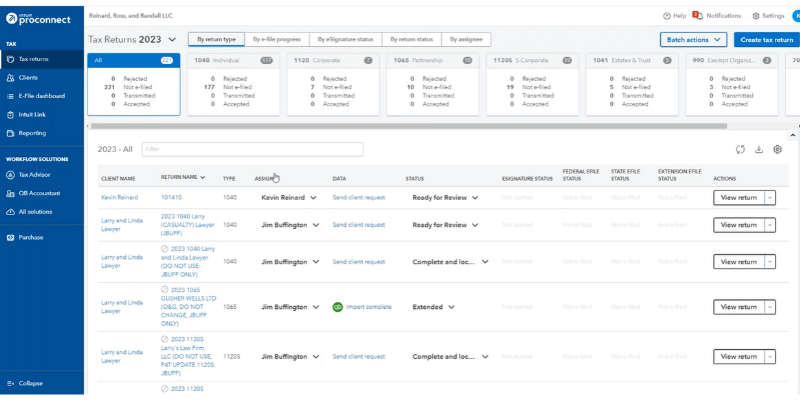
Intuit ProConnect Tax is a cloud-based tax preparation solution for firms handling complex returns. It’s a strong fit for practices that need a QuickBooks integration or want to expand their advisory services capabilities.
What are the top three features of ProConnect?
- Straightforward cloud-based workflow with direct QuickBooks integration.
- Advanced tax planning and advisory insights tools.
- Support for over 7,200 tax forms with award-winning functionality.
8. Intuit Lacerte Tax

Intuit Lacerte Tax is a professional-grade desktop tax solution for firms managing complex corporate and individual returns that require comprehensive diagnostic capabilities and extensive form coverage.
What are the top three features of Lacerte?
- Powerful desktop solution with hosting options for flexible access.
- Advanced diagnostics for identifying errors and optimization opportunities.
- Extensive form coverage for complex business and individual returns.
9. Intuit ProSeries Tax
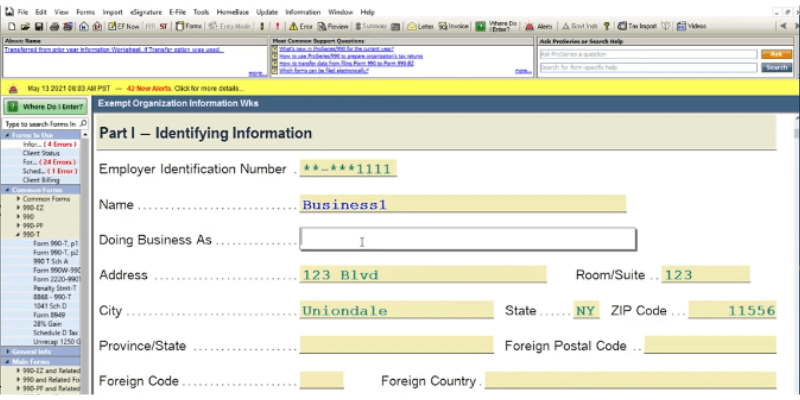
Intuit ProSeries Tax is a comprehensive tax preparation software designed to maximize efficiency, reduce preparation time, and streamline your entire tax workflow from start to finish.
With over ten package choices, ProSeries has the widest range of capabilities dependent on the specific tax work you do.
What are the top three features across all ProSeries versions?
- Cloud access with automatic backups: 90% of users report significant time savings.
- Fixed asset manager that simplifies depreciation calculations and ensures accurate asset tracking.
- Built-in eSignature tool that eliminates paper handling and accelerates approvals.
10. Bloomberg Tax Provision

Bloomberg Tax Provision is a specialized tax solution for firms with technical ASC 740 income tax provision needs and strict GAAP compliance requirements. Its audit-ready tax provisioning lets you send reports directly to auditors from an easy-to-use interface.
What are the top three features of Bloomberg Tax?
- Comprehensive ASC 740 income tax provision capabilities.
- Strong GAAP compliance tools and documentation.
- Detailed state-by-state tax calculations and analysis.
11. Drake Tax

Drake Tax is an efficient tax preparation system built for high-volume practices that need straightforward workflows and consistent processing capabilities.
What are the top three features of Drake Tax?
- Exceptionally efficient interface designed for high-volume processing.
- Comprehensive tax preparation capabilities with minimal learning curve.
- Cost-effective solution for firms processing large numbers of returns.
The Best Accounting and Tax Software Recommendations by Firm Focus
Selecting the right software depends heavily on your firm’s size, client base, and specialization. Below are our recommendations based on different firm profiles.
Solo practitioners and freelancers
FreshBooks and Zoho Books are the best accounting software options for solo practitioners and freelancers. Both offer simple, affordable pricing and interfaces that don’t require extensive onboarding or IT support. Xero is a capable alternative for those who want stronger client collaboration features.
- Primary: FreshBooks, Zoho Books
- Alternative: Xero
Small general practices
QuickBooks® Online and Xero are the strongest fits for small general accounting practices. Both are scalable, integrate with a wide ecosystem of apps, and support real-time access. Sage 50, Zoho Books, and FreshBooks are solid alternatives depending on your workflow needs.
- Primary: QuickBooks Online, Xero
- Alternatives: Sage 50, Zoho Books, FreshBooks
Mid-sized, inventory, and retail firms
QuickBooks® Desktop Enterprise is the primary recommendation for mid-sized firms, retailers, and wholesalers with complex inventory requirements. It supports up to 1 million items and advanced multi-location management. Sage 50 Accounting is the leading alternative for firms that need deep customization.
- Primary: QuickBooks Desktop Enterprise
- Alternative: Sage 50 Accounting
High-volume tax practices
Drake Tax is the strongest choice for high-volume tax practices. Its efficient processing interface and minimal learning curve make it well-suited for firms preparing large numbers of returns. ProSeries Tax is a capable alternative with a broader range of package options.
- Primary: Drake Tax
- Alternative: ProSeries Tax
Complex tax and compliance firms
Bloomberg Tax Provision and Intuit Lacerte® Tax are the top choices for firms managing complex tax and compliance work. Bloomberg Tax addresses technical ASC 740 provisions and strict GAAP requirements. Lacerte handles complex corporate and individual returns with advanced diagnostics. ProConnect Tax is a strong cloud-based alternative.
- Primary: Bloomberg Tax, Lacerte Tax
- Alternative: ProConnect Tax
International and global firms
Xero and Zoho Books are the best fits for accounting firms with international clients. Both offer multi-currency support and international workflow capabilities. QuickBooks® Online supports multiple currencies in higher-tier subscription plans and is a solid alternative for firms already in the QuickBooks environment.
- Primary: Xero, Zoho Books
- Alternative: QuickBooks Online
8 Tips for Choosing the Best Accounting and Tax Software for You
The best accounting or tax software for your firm depends on your size, industry, growth plans, and specific workflow needs.
Below are eight tips to guide your selection process:
1. Identify your needs and pain points
- Tip: Identify needs and pain points.
- Why it matters: Ensures software solves your real problems.
Assess your current workflows and identify where you spend the most time or encounter the most errors. Then, list your must-have features (e.g., multi-currency, payroll, inventory management) and nice-to-haves (e.g., AI-powered forecasting, advanced analytics).
2. Prioritize scalability and flexibility
- Tip: Scalability and flexibility.
- Why it matters: Accommodates future growth.
Choose software that can grow with your firm, supporting more clients, users, and complex requirements as you expand. Look for flexible pricing plans and the ability to add features or integrations as your needs evolve.
3. Opt for cloud-based solutions
- Tip: Cloud-based access.
- Why it matters: Enables remote work and real-time collaboration.
Cloud-based platforms offer anytime, anywhere access, real-time collaboration, and automatic updates. These features are now considered essential for most firms in 2026.
Cloud solutions also support remote work and easier integration with other business tools.
Not sure if your firm is ready for the cloud? Our complete assessment guide walks through the exact questions to ask before you make a move. Download →
4. Focus on security and compliance
- Tip: Security and compliance.
- Why it matters: Protects data and meets legal requirements.
Make sure the software uses strong security measures like encryption, multifactor authentication, and regular backups. Verify compliance with relevant industry standards and regulations (e.g., GDPR, local tax laws).

5. Evaluate user experience and support
- Tip: User experience and support.
- Why it matters: Reduces errors and training time.
Select a platform with an intuitive, user-friendly interface to minimize training time and errors. Review the quality and availability of customer support, including tutorials, live chat, and knowledge bases.
Pro tip: Read testimonials and reviews from firms similar to yours to gauge customer satisfaction, reliability, and real-world performance.
6. Check integration and automation capabilities
- Tip: Integration and automation.
- Why it matters: Streamlines workflows and saves time.
Look for straightforward integration with your existing tools (e.g., payroll, CRM, inventory) to reduce manual data entry and streamline workflows. Automation features like recurring invoicing, bank reconciliation, and AI-driven insights can save significant time and reduce errors.
7. Take advantage of free trials and demos
- Tip: Free trials/demos.
- Why it matters: Allows you to test before you buy.
Test shortlisted software with free trials or live demos to assess usability, feature fit, and compatibility with your workflows before committing.
8. Consider industry-specific needs
- Tip: Industry-specific features.
- Why it matters: Addresses unique business needs.
If your firm has unique requirements (e.g., project tracking for construction, inventory for retail), make sure the software offers relevant features or add-ons.
You’ve Chosen Your Accounting and Tax Software…Now What?
Selecting the right accounting and tax software is just the first step in optimizing your firm’s operations.
Once you’ve made your choice, whether it’s QuickBooks, Xero, Sage, or another solution, the next critical decision is how to implement and manage it effectively within your overall technology environment.
My advice: consider a centralized workspace for all your applications.
A centralized platform like Rightworks Cloud Premier:
- Allows you to sign in once to access all your applications.
- Enables teams to work from anywhere there’s an internet connection.
- Gives clients real-time access to the latest data and information.
- Keeps your data safe with reliable backups.
- Strengthens security with multifactor authentication, managed credentialing, and advanced threat protection.
Your software choice is just the beginning: how you implement and connect it determines your true competitive advantage. By centralizing your technology environment, you’ll transform good accounting tools into a powerful platform that drives efficiency, security, and growth for years to come.

FAQs
QuickBooks® Desktop Enterprise (QBD) is an installed desktop solution built for businesses with complex inventory needs and high data volumes, supporting up to 1 million items. QuickBooks® Online (QBO) is a cloud-based platform for small to medium firms that need remote access, real-time collaboration, and an extensive app ecosystem. Firms using QBD can also access it remotely through a cloud hosting provider like Rightworks without switching platforms entirely.
It depends on your service mix. Firms providing bookkeeping and financial reporting typically rely on accounting software like QuickBooks Online or Xero. Firms that also prepare tax returns need purpose-built tax software such as Lacerte, ProSeries, or Drake Tax. Many full-service accounting firms use both categories of software together.
Intuit Lacerte® Tax and ProConnect Tax are widely used by CPA firms handling complex individual and business returns. Drake Tax is popular in high-volume practices due to its efficient processing interface. ProSeries Tax offers the broadest range of packages for firms with varied tax service needs.
Cloud-based accounting software uses encryption, multifactor authentication, and regular backups to protect client data. Security also depends on how your firm manages credentials and user access controls. For firms using desktop software like Lacerte or QuickBooks Desktop Enterprise, cloud hosting through a provider like Rightworks adds a security layer without requiring a full platform switch.
Yes. Desktop applications including QBD, Lacerte, ProSeries, and Drake Tax can all be hosted in the cloud through a provider like Rightworks. This gives your team remote access and centralized data management without abandoning the software your firm already knows.
Key factors include your firm’s size, client base, and required workflows. Evaluate scalability, integration with existing tools, security features, user experience, and the quality of available customer support. Taking advantage of free trials before committing can also reveal usability gaps that aren’t visible in product demos.
Xero and Zoho Books both support multi-currency transactions and international workflows, making them well-suited for firms with global client bases. QuickBooks® Online also supports multiple currencies in higher-tier subscription plans.
